Okhttp 源码分析

OkHttp 是 Square 公司开源的网络请求框架。有如下优点:

  • 支持 HTTPS;
  • 支持 HTTP2/SPDY;
  • Socket 自动选择最好路线,并支持自动重连;
  • 连接池(ConnectionPool)减少了请求延迟;
  • 透明 GZip 压缩;
  • HTTP 缓存,只支持 GET 请求;
  • 当网络出现问题时,OkHttp 会自动重试一个主机的多个 IP 地址;
  • 拦截器机制,轻松处理请求与响应。

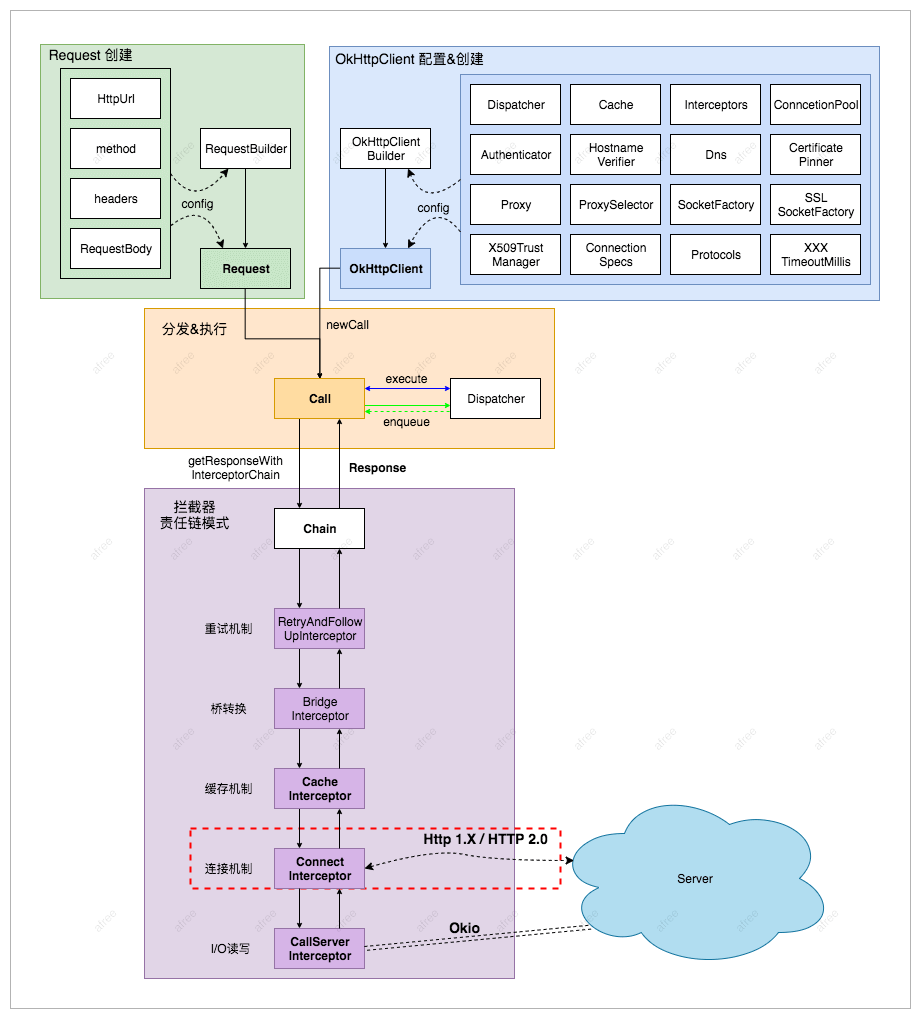
OkHttp 系统层级结构图:

okhttp

关键角色:

  • OkHttpClient:通信的客户端,用来统一管理发起请求与解析响应;
  • Request:封装网络请求的具体信息,例如:url、header 等;
  • RequestBody:请求体,用来提交流、表单等请求信息;
  • Response:请求的响应,获取响应信息,例如:响应 header 等;
  • ResponseBody:请求的响应体,只能使用一次,所以我们重复调用 responseBody.string() 会报错;
  • Call:Call 是一个接口,它是 HTTP 请求的抽象描述。具体实现类是 RealCall,它由 CallFactory 创建;
  • Interceptor:负责拦截并处理请求,它将网络请求、缓存、透明压缩等功能都统一起来,每个功能都是一个 Interceptor,所有的 Interceptor 最终连接成一个Interceptor.Chain。典型的责任链模式实现;
  • StreamAllocation:用来控制 Connections 与 Streams 的资源分配与释放;
  • RouteSelector:选择路线与自动重连;
  • Chche:根据 URL 以及请求参数来生成,只缓存 GET 请求。在 Cache#put(Response response) 对 GET 判断。通过DiskLruCache实现;
  • 默认支持 gzip 压缩。BridgeInterceptor.java

okhttp-flow

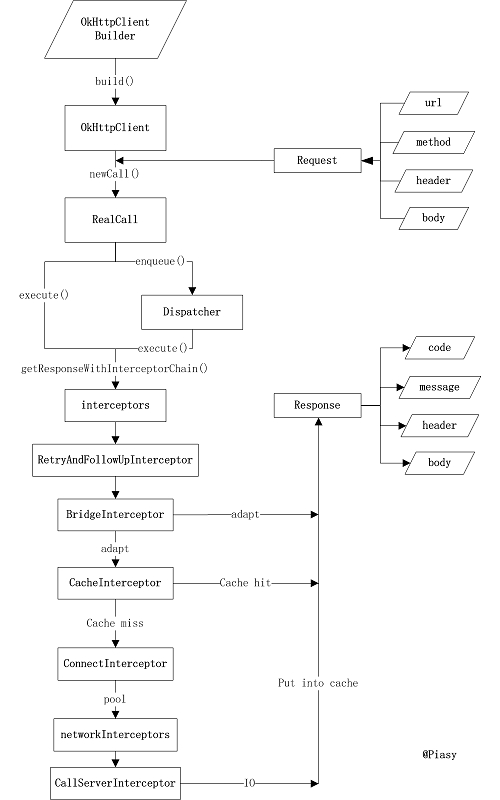
  1. OkhttpClient 对象是通过 OkHttpClient.Builder 对象构建出来的,可以设置缓存、超时时间、SSL/TLS、拦截器和连接池等参数;
  2. 通过 Request.Builder 设置请求方法、url、header、tag 和 CacheControl 等参数,构造 Request 对象;
  3. OkHttpClient 对象通过 newCall() 方法,以 Request 对象为参数,创建一个 RealCall 对象。每个 Call 只能允许执行一次;
  4. 通过 RealCall 对象的同步方法 execute() 和异步方法 enqueue() 方法交给 Dispatcher 调度执行。异步请求被包装成了 Runnable 的实现类 AsyncCall;
  5. Dispatcher 包含了线程池和三个双向队列(readyAsyncCalls, runningAsyncCalls, runningSyncCalls)。最大允许 64 个并发,每个域名允许最多5个请求;
  6. 通过拦截器机制(RealInterceptorChain)层层修改,最后通过 CallServerInterceptor 发起网络请求;
  7. CallServerInterceptor 中通过 ExchangeCodec 发起 Socket 请求,使用 Okio 封装 Response,返回给客户端。

Request

Request 代表网络请求的对象,通过 Request.Builder 来构建。默认 GET 请求。

1
2
3
4
5
6
7
8
9
10
11
12
/**
* An HTTP request. Instances of this class are immutable if their [body] is null or itself
* immutable.
*/
class Request internal constructor(
val url: HttpUrl, val method: String,
val headers: Headers, val body: RequestBody?,
internal val tags: Map<Class<*>, Any>) {

open class Builder {
}
}

Request 通过 Builder 模式创建实例。

RequestBody

1
2
3
4
5
6
7
8
9
10
11
12
abstract class RequestBody {
abstract fun contentType(): MediaType?
open fun contentLength(): Long = -1L
abstract fun writeTo(sink: BufferedSink)
open fun isDuplex(): Boolean = false
open fun isOneShot(): Boolean = false

companion object {
fun String.toRequestBody(contentType: MediaType? = null): RequestBody {}
fun File.asRequestBody(contentType: MediaType? = null): RequestBody {}
}
}

RequestBody 是抽象类,具体实现有 FormBodyMultipartBody ,分被对应 application/x-www-form-urlencoded 和 multipart/xxx 类型。

FormBody:

表示使用表单方式提交。

1
2
3
4
5
class FormBody internal constructor(encodedNames: List<String>, encodedValues: List<String>) : RequestBody() {
companion object {
private val CONTENT_TYPE: MediaType = "application/x-www-form-urlencoded".toMediaType()
}
}

示例:

1
2
3
4
FormBody.Builder(Charset.defaultCharset())
.add("name", "mumu")
.add("age", "18")
.build()

MultipartBody:

表示使用多部分方式提交。

1
2
3
4
5
6
7
8
9
10
11
12
class MultipartBody internal constructor(
private val boundaryByteString: ByteString,
val type: MediaType, val parts: List<Part>) : RequestBody() {

companion object {
val MIXED = "multipart/mixed".toMediaType()
val ALTERNATIVE = "multipart/alternative".toMediaType()
val DIGEST = "multipart/digest".toMediaType()
val PARALLEL = "multipart/parallel".toMediaType()
val FORM = "multipart/form-data".toMediaType()
}
}
1
2
3
4
5
6
MultipartBody.Builder()
.setType(MultipartBody.FORM)
.addFormDataPart("name", "Vance")
.addFormDataPart("age", "18")
.addFormDataPart("photo", "photo.png",
File("").asRequestBody("image/png".toMediaType()))

Response

1
2
3
4
5
6
7
8
9
10
/**
* An HTTP response. Instances of this class are not immutable: the response body is a one-shot
* value that may be consumed only once and then closed. All other properties are immutable.
*
* This class implements [Closeable]. Closing it simply closes its response body. See
* [ResponseBody] for an explanation and examples.
*/
class Response internal constructor(val request: Request, ..., val body: ResponseBody?, ...){
open class Builder {}
}

使用 Builder 模式设置参数。

1
2
3
4
5
6
7
8
9
10
11
12
13
14
/**
A one-shot stream from the origin server to the client application with the raw bytes of the response body.
The response body can be consumed only once.
*/
abstract class ResponseBody : Closeable {
fun string(): String = source().use { source ->
source.readString(charset = source.readBomAsCharset(charset()))
}
private fun charset() = contentType()?.charset(UTF_8) ?: UTF_8
override fun close() = source().closeQuietly()
companion object {
fun String.toResponseBody(contentType: MediaType? = null): ResponseBody {}
}
}

ResponseBody 是抽象类,代表响应体,用于操作网络请求返回的内容。
两个实现类是 RealResponseBodyCacheResponseBody,分别代表真实响应和缓存响应。

注意事项:

  1. ResponseBody 必须关闭,否则会造成资源泄漏。
  2. ResponseBody 只能被消费一次,因为最终都要通过 Util.closeQuietly(source) 方法关闭 source。
  3. 如果 ResponseBody 中的数据很大,则不应该使用 bytes() 或 string() 方法,它们会将结果一次性读入内存,而应该使用 byteStream() 或 charStream(),以流的方式读取数据。

Call

1
2
3
4
5
6
7
8
9
10
11
12
13
14
15
16
17
18
/**
* A call is a request that has been prepared for execution. A call can be canceled. As this object
* represents a single request/response pair (stream), it cannot be executed twice.
*/
interface Call : Cloneable {
fun request(): Request
fun execute(): Response
fun enqueue(responseCallback: Callback)
fun cancel()
fun isExecuted(): Boolean
fun isCanceled(): Boolean
fun timeout(): Timeout
public override fun clone(): Call

fun interface Factory {
fun newCall(request: Request): Call
}
}

Call 是接口,表示一个已经准备好可以随时执行的 HTTP 请求。每个 Call 对象只能执行一次请求,可以查询请求的执行状态,或者取消当前请求。唯一实现类是 RealCall

1
2
3
4
5
6
7
8
9
10
11
12
13
14
15
16
17
18
19
20
21
22
23
24
25
26
27
28
29
30
31
32
33
34
35
36
37
38
39
40
41
42
43
44
45
46
47
48
49
50
51
52
class RealCall(val client: OkHttpClient, val originalRequest: Request, ...) : Call {

override fun execute(): Response {
try {
client.dispatcher.executed(this)
return getResponseWithInterceptorChain()
} finally {
client.dispatcher.finished(this)
}
}

override fun enqueue(responseCallback: Callback) {
//Call 只能执行一次
check(executed.compareAndSet(false, true)) { "Already Executed" }
client.dispatcher.enqueue(AsyncCall(responseCallback))
}

//异步请求回调封装类
internal inner class AsyncCall(private val responseCallback: Callback) : Runnable {

/**
* Attempt to enqueue this async call on [executorService]. This will attempt to clean up
* if the executor has been shut down by reporting the call as failed.
*/
fun executeOn(executorService: ExecutorService) {
var success = false
try {
executorService.execute(this)
success = true
} catch (e: RejectedExecutionException) {
responseCallback.onFailure(this@RealCall, ioException)
} finally {
if (!success) {
client.dispatcher.finished(this) // This call is no longer running!
}
}
}

override fun run() {
threadName("OkHttp ${redactedUrl()}") {
try {
val response = getResponseWithInterceptorChain()
responseCallback.onResponse(this@RealCall, response)
} catch (e: IOException) {
responseCallback.onFailure(this@RealCall, e)
} finally {
client.dispatcher.finished(this)
}
}
}
}
}
  1. 每个 Call 只能执行一次,可以使用 Call.clone() 方法克隆新对象执行;
  2. execute() 表示执行同步请求,添加到 Dispatcher#runningSyncCalls 队列中;
  3. enqueue() 表示执行异步请求,先封装为 AsyncCall(Runnable 的子类),再添加到 Dispatcher#readyAsyncCalls 队列中,通过线程池执行;
  4. 同步和异步请求都是通过 RealCall#getResponseWithInterceptorChain() 获取响应结果,最后调用 Dispatcher#finish() 方法结束请求;

拦截器

okhttp-core-interceptor
okhttp-interceptors

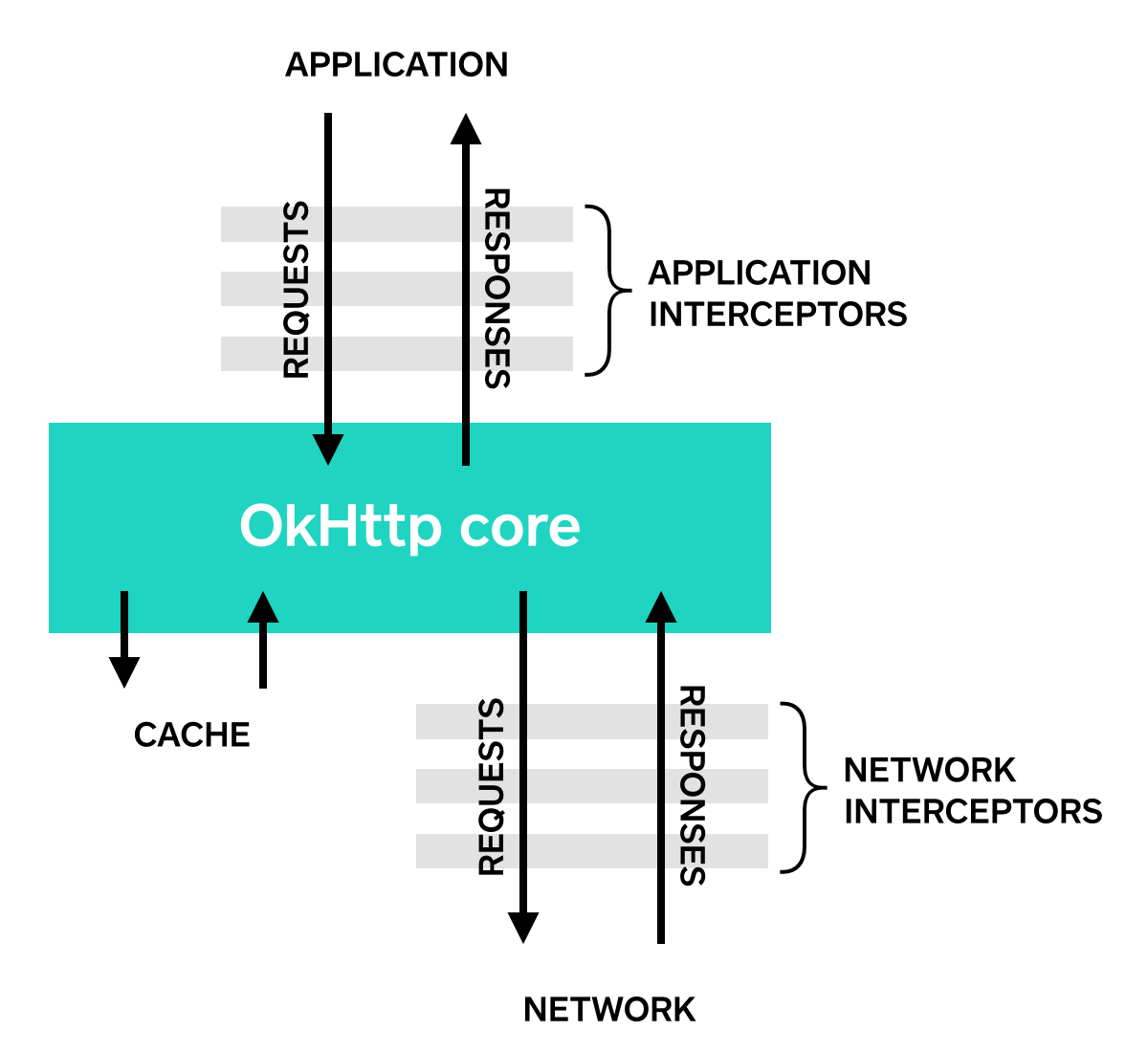
应用拦截器:

  1. 不需要关心像重定向和重试这样的中间响应。
  2. 总是调用一次,即使 HTTP 响应从缓存中获取数据。
  3. 监视应用原始意图。不关心 OkHttp 注入的像 If-None-Match 头。
  4. 允许短路并不调用 Chain.proceed()。
  5. 允许重试并执行多个 Chain.proceed() 调用。

网络拦截器:

  1. 可以操作像重定向和重试这样的中间响应。
  2. 对于短路网络的缓存响应不会调用。
  3. 监视即将要通过网络传输的数据。

RealInterceptorChain

1
2
3
4
5
6
7
8
9
10
11
12
13
14
15
16
17
18
19
20
21
22
23
24
25
26
27
28
29
30
31
/**
* Bridge between OkHttp's application and network layers. This class exposes high-level application
* layer primitives: connections, requests, responses, and streams.
*/
class RealCall(val client: OkHttpClient, val originalRequest: Request,
val forWebSocket: Boolean) : Call {

internal fun getResponseWithInterceptorChain(): Response {
// Build a full stack of interceptors.
val interceptors = mutableListOf<Interceptor>()
interceptors += client.interceptors
interceptors += RetryAndFollowUpInterceptor(client)
interceptors += BridgeInterceptor(client.cookieJar)
interceptors += CacheInterceptor(client.cache)
interceptors += ConnectInterceptor
if (!forWebSocket) {
interceptors += client.networkInterceptors
}
interceptors += CallServerInterceptor(forWebSocket)

val chain = RealInterceptorChain(
call = this,
interceptors = interceptors,
index = 0,
//...
)

val response = chain.proceed(originalRequest)
return response
}
}

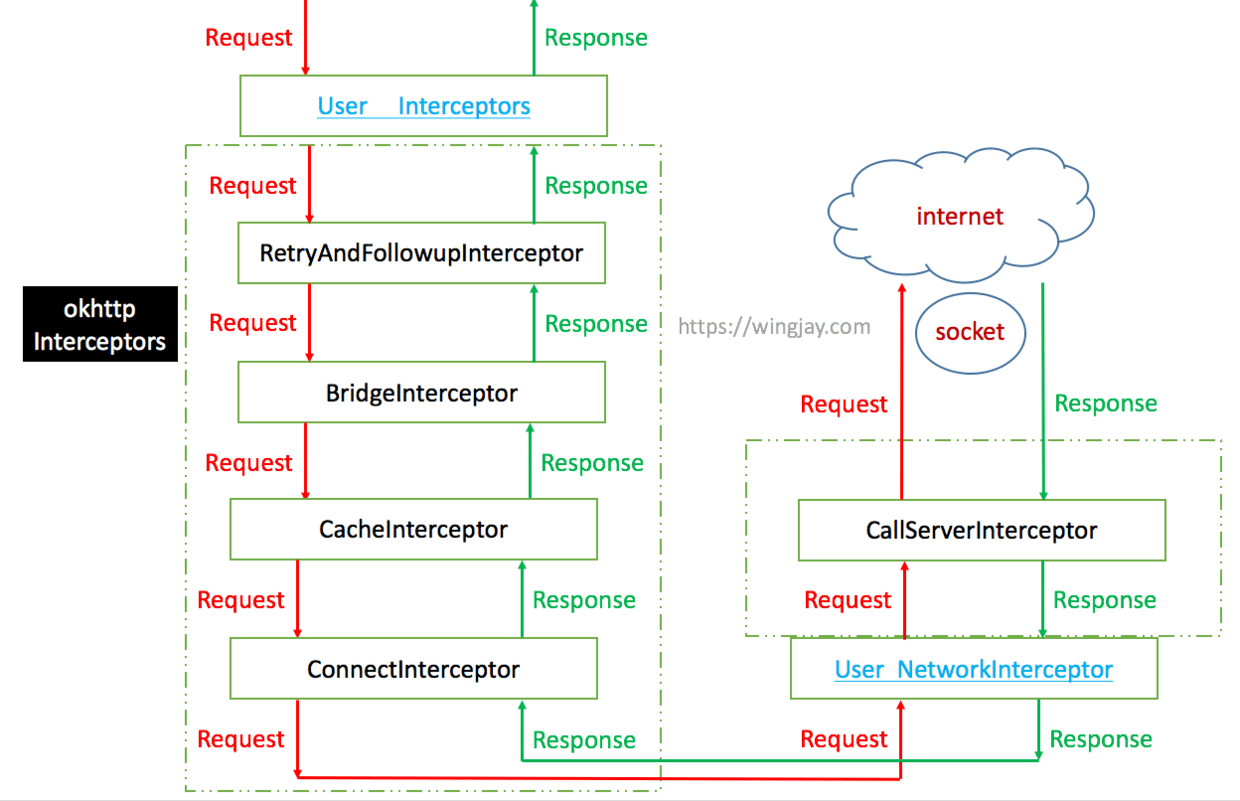
RealCall 发起同步和异步请求时,先收集所有拦截器,再调用 RealInterceptorChain#proceed() 方法运行拦截器,获取响应。

1
2
3
4
5
6
7
8
9
10
11
12
13
14
15
16
17
18
19
20
21
22
23
24
25
26
27
28
29
30
31
32
33
34
35
36
37
38
39
40
41
42
43
44
45
46
47
48
49
/**
* A concrete interceptor chain that carries the entire interceptor chain: all application
* interceptors, the OkHttp core, all network interceptors, and finally the network caller.
*/
class RealInterceptorChain(
internal val call: RealCall,
private val interceptors: List<Interceptor>,
private val index: Int,
//...
) : Interceptor.Chain {
override fun proceed(request: Request): Response {

// 记录当前拦截器执行的次数
calls++

// exchange 不为空说明连接已建立
if (exchange != null) {
// 已建立连接后不允许修改域名和端口号
check(exchange.finder.sameHostAndPort(request.url)) {
"network interceptor ${interceptors[index - 1]} must retain the same host and port"
}
// 网络拦截器只允许运行一次
check(calls == 1) {
"network interceptor ${interceptors[index - 1]} must call proceed() exactly once"
}
}

// 创建下一个拦截器的 RealInterceptorChain
// Call the next interceptor in the chain.
val next = copy(index = index + 1, request = request)
val interceptor = interceptors[index]

// 调用下一个拦截器的 intercept() 方法,并传入 Chain
val response = interceptor.intercept(next) ?: throw NullPointerException(
"interceptor $interceptor returned null")

// 检查网络拦截器,只能运行一次
if (exchange != null) {
check(index + 1 >= interceptors.size || next.calls == 1) {
"network interceptor $interceptor must call proceed() exactly once"
}
}

// 响应体不能为空
check(response.body != null) { "interceptor $interceptor returned a response with no body" }

return response
}
}
  1. 创建新的 RealInterceptorChain 实例,index + 1;
  2. 通过 index 获取下一个拦截器并执行 intercept(chain) 方法;
  3. 在 intercept(chain) 方法中执行 chain.proceed() 方法,回到了第一步,达到了按顺序调用拦截器的目的;
  4. 应用拦截器可以执行多次,应用拦截器只能执行一次;

RetryAndFollowUpInterceptor

负责处理失败重连和重定向,最多重定向 20 次。

1
2
3
4
5
6
7
8
9
10
11
12
13
14
15
16
17
18
19
20
21
22
23
24
25
26
27
28
29
30
31
32
33
34
35
36
37
38
39
40
41
42
/**
* This interceptor recovers from failures and follows redirects as necessary. It may throw an
* [IOException] if the call was canceled.
*/
class RetryAndFollowUpInterceptor(private val client: OkHttpClient) : Interceptor {
override fun intercept(chain: Interceptor.Chain): Response {
var followUpCount = 0
while (true) {
var response: Response
try {
if (call.isCanceled()) {
throw IOException("Canceled")
}
try {
response = realChain.proceed(request)
} catch (e: RouteException) {
// The attempt to connect via a route failed. The request will not have been sent.
//如果不能恢复抛出异常,否则把异常信息保存到集合中
continue
} catch (e: IOException) {
// An attempt to communicate with a server failed. The request may have been sent.
//如果不能恢复抛出异常,否则把异常信息保存到集合中
continue
}

// 根据响应码创建新的 Request 或 null
val followUp = followUpRequest(response, exchange)
if (++followUpCount > MAX_FOLLOW_UPS) {
throw ProtocolException("Too many follow-up requests: $followUpCount")
}
}
}
}

companion object {
/**
* How many redirects and auth challenges should we attempt? Chrome follows 21 redirects; Firefox,
* curl, and wget follow 20; Safari follows 16; and HTTP/1.0 recommends 5.
*/
private const val MAX_FOLLOW_UPS = 20
}
}

BridgeInterceptor

应用层和网络层之间的桥接拦截器,负责把应用层发出的请求转换为网络层认识的请求(比如添加 Content-Type、Cookie 等请求头,处理 gzip 压缩)和把网络层执行后的响应变为应用层友好的响应。

1
2
3
4
5
6
7
8
9
10
11
12
13
14
15
16
17
18
19
20
21
22
23
24
25
26
27
28
29
30
31
32
33
34
35
36
37
38
39
40
41
42
/**
* Bridges from application code to network code. First it builds a network request from a user
* request. Then it proceeds to call the network. Finally it builds a user response from the network
* response.
*/
class BridgeInterceptor(private val cookieJar: CookieJar) : Interceptor {
override fun intercept(chain: Interceptor.Chain): Response {
val userRequest = chain.request()
val requestBuilder = userRequest.newBuilder()

//处理用户请求的 header

//自动支持 gzip 压缩
var transparentGzip = false
if (userRequest.header("Accept-Encoding") == null && userRequest.header("Range") == null) {
transparentGzip = true
requestBuilder.header("Accept-Encoding", "gzip")
}

val networkResponse = chain.proceed(requestBuilder.build())
val responseBuilder = networkResponse.newBuilder().request(userRequest)

//处理 gzip 压缩
if (transparentGzip &&
"gzip".equals(networkResponse.header("Content-Encoding"), ignoreCase = true) &&
networkResponse.promisesBody()) {
val responseBody = networkResponse.body
if (responseBody != null) {
val gzipSource = GzipSource(responseBody.source())
val strippedHeaders = networkResponse.headers.newBuilder()
.removeAll("Content-Encoding")
.removeAll("Content-Length")
.build()
responseBuilder.headers(strippedHeaders)
val contentType = networkResponse.header("Content-Type")
responseBuilder.body(RealResponseBody(contentType, -1L, gzipSource.buffer()))
}
}

return responseBuilder.build()
}
}

CacheInterceptor

负责读取和更新缓存。

1
2
3
4
5
6
7
8
9
10
11
12
13
14
15
16
17
18
19
20
21
22
23
24
25
26
27
28
29
30
31
32
33
34
35
36
37
38
39
40
41
42
43
44
45
46
47
48
49
50
51
52
53
54
55
56
57
58
/** Serves requests from the cache and writes responses to the cache. */
class CacheInterceptor(internal val cache: Cache?) : Interceptor {
override fun intercept(chain: Interceptor.Chain): Response {
val strategy = CacheStrategy.Factory(now, chain.request(), cacheCandidate).compute()
val networkRequest = strategy.networkRequest
val cacheResponse = strategy.cacheResponse

// If we're forbidden from using the network and the cache is insufficient, fail.
if (networkRequest == null && cacheResponse == null) {
//返回 504 错误
}

if (networkRequest == null) {
//使用缓存且缓存可用,返回缓存数据
return cacheResponse!!.newBuilder()
.cacheResponse(stripBody(cacheResponse))
.build().also {
listener.cacheHit(call, it)
}
}

var networkResponse = chain.proceed(networkRequest)

if (cacheResponse != null) {
if (networkResponse?.code == HTTP_NOT_MODIFIED) {
//缓存存在且 code = 304,表示服务端资源没有修改,更新缓存并返回
cache.update(cacheResponse, response)
return response.also {
listener.cacheHit(call, it)
}
} else {
// 如果是非304,说明服务端资源有更新,就关闭缓存响应体
cacheResponse.body?.closeQuietly()
}
}

//创建 response 对象
val response = networkResponse!!.newBuilder()
.cacheResponse(stripBody(cacheResponse))
.networkResponse(stripBody(networkResponse))
.build()

if (cache != null) {
if (response.promisesBody() && CacheStrategy.isCacheable(response, networkRequest)) {
// 只缓存 GET 请求
val cacheRequest = cache.put(response)
//保存缓存
return cacheWritingResponse(cacheRequest, response)
}

// 不是 GET 请求,移除缓存
if (HttpMethod.invalidatesCache(networkRequest.method)) {
cache.remove(networkRequest)
}
}
return response
}
}

当被 CacheStrategy 加工输出后,输出 networkRequest 与 cacheResponse,根据是否为空执行不同的请求。

networkRequest cacheResponse result
null null only-if-cached (表明不进行网络请求且缓存不存在或过期,返回 504 错误)
null non-null 不进行网络请求,且缓存可以使用,直接返回缓存
non-null non-null 资源未修改,返回缓存
non-null null 请求网络,缓存 GET 请求,保存到本地
  1. 只缓存 GET 请求的响应;
  2. 使用 DiskLruCache 实现内存缓存;
  3. 使用 Okio 来实现缓存文件的读写;
  4. 基于 Http 的缓存头,实现缓存机制;

ConnectInterceptor

负责与服务器建立链接,初始化 Exchange,建立连接。

1
2
3
4
5
6
7
8
9
10
/**
* Opens a connection to the target server and proceeds to the next interceptor. The network might
* be used for the returned response, or to validate a cached response with a conditional GET.
*/
object ConnectInterceptor : Interceptor {
val realChain = chain as RealInterceptorChain
val exchange = realChain.call.initExchange(chain)
val connectedChain = realChain.copy(exchange = exchange)
return connectedChain.proceed(realChain.request)
}

CallServerInterceptor

负责向服务器发送请求,获取数据。

1
2
3
4
5
6
7
8
9
10
11
12
13
14
15
16
/** This is the last interceptor in the chain. It makes a network call to the server. */
class CallServerInterceptor(private val forWebSocket: Boolean) : Interceptor {
override fun intercept(chain: Interceptor.Chain): Response {

var response = responseBuilder
.request(request)
.handshake(exchange.connection.handshake())
.sentRequestAtMillis(sentRequestMillis)
.receivedResponseAtMillis(System.currentTimeMillis())
.build()
response.newBuilder()
.body(exchange.openResponseBody(response))
.build()
}

}

Dispatcher 调度器

1
2
3
4
5
6
7
8
9
10
11
12
13
14
15
16
17
18
19
20
21
22
23
24
25
26
27
28
29
30
31
32
33
34
35
36
37
38
39
40
41
42
43
44
45
46
47
48
49
50
51
52
53
54
55
56
57
58
59
60
61
62
63
64
65
66
67
68
69
70
71
72
73
74
75
76
77
78
79
80
81
82
83
84
85
86
87
88
89
90
91
92
93
94
95
96
97
98
99
100
101
102
103
104
105
106
class Dispatcher constructor() {
var maxRequests = 64
var maxRequestsPerHost = 5
val executorService: ExecutorService
get() {
if (executorServiceOrNull == null) {
executorServiceOrNull = ThreadPoolExecutor(0, Int.MAX_VALUE, 60, TimeUnit.SECONDS,
SynchronousQueue(), threadFactory("$okHttpName Dispatcher", false))
}
return executorServiceOrNull!!
}

/** Ready async calls in the order they'll be run. */
private val readyAsyncCalls = ArrayDeque<AsyncCall>()

/** Running asynchronous calls. Includes canceled calls that haven't finished yet. */
private val runningAsyncCalls = ArrayDeque<AsyncCall>()

/** Running synchronous calls. Includes canceled calls that haven't finished yet. */
private val runningSyncCalls = ArrayDeque<RealCall>()

internal fun enqueue(call: AsyncCall) {
synchronized(this) {
readyAsyncCalls.add(call)

if (!call.call.forWebSocket) {
val existingCall = findExistingCallWithHost(call.host)
if (existingCall != null) call.reuseCallsPerHostFrom(existingCall)
}
}
promoteAndExecute()
}

/**
* Promotes eligible calls from [readyAsyncCalls] to [runningAsyncCalls] and runs them on the
* executor service. Must not be called with synchronization because executing calls can call
* into user code.
*
* @return true if the dispatcher is currently running calls.
*/
private fun promoteAndExecute(): Boolean {
this.assertThreadDoesntHoldLock()

val executableCalls = mutableListOf<AsyncCall>()
val isRunning: Boolean
synchronized(this) {
val i = readyAsyncCalls.iterator()
while (i.hasNext()) {
val asyncCall = i.next()

// 判断是否达到最大并发数
if (runningAsyncCalls.size >= this.maxRequests) break // Max capacity.
// 判断是否达到每个域名最大并发数
if (asyncCall.callsPerHost.get() >= this.maxRequestsPerHost) continue // Host max capacity.

// 从等待队列中移除
i.remove()
// Host并发数加 1
asyncCall.callsPerHost.incrementAndGet()
// 加入可执行请求的集合
executableCalls.add(asyncCall)
// 加入正在执行的异步请求队列
runningAsyncCalls.add(asyncCall)
}
isRunning = runningCallsCount() > 0
}

for (i in 0 until executableCalls.size) {
val asyncCall = executableCalls[i]
asyncCall.executeOn(executorService)
}

return isRunning
}

/** Used by [Call.execute] to signal it is in-flight. */
@Synchronized internal fun executed(call: RealCall) {
runningSyncCalls.add(call)
}

internal fun finished(call: AsyncCall) {
call.callsPerHost.decrementAndGet()
finished(runningAsyncCalls, call)
}

internal fun finished(call: RealCall) {
finished(runningSyncCalls, call)
}

private fun <T> finished(calls: Deque<T>, call: T) {
val idleCallback: Runnable?
synchronized(this) {
// 移除已完成的任务
if (!calls.remove(call)) throw AssertionError("Call wasn't in-flight!")
idleCallback = this.idleCallback
}

// 将等待队列中的请求移入异步队列,并交由线程池执行
val isRunning = promoteAndExecute()

// 如果没有请求需要执行,回调闲置callback
if (!isRunning && idleCallback != null) {
idleCallback.run()
}
}
}
  1. 最多同时执行 64 个请求,每个域名允许最多 5 个请求;
  2. 包含 3 个双向队列,readyAsyncCalls、runningAsyncCalls 和 runningSyncCalls 分别用来保存可运行的异步任务、运行中的异步任务和运行中的同步任务;
  3. Dispatcher 使用的线程池的核心线程数为 0,非核心线程无限制,空闲线程最长存活 60s,使用的是 SynchronousQueue 同步队列,适合快速响应任务的场景,提高并发量;
  4. promoteAndExecute() 在 Call 初次执行和执行完成后调用。遍历待运行队列,添加到运行队列中,并从待运行队列中移除 Call。然后遍历运行队列,提交到线程池。

建立网络链接

Route/RouteSelector

RealConnection

同一个 Connection 可能会承载多个 HTTP 的请求与响应。

1
2
3
4
5
6
7
8
9
10
11
12
13
14
15
16
17
private fun connectSocket(...) {
val proxy = route.proxy
val address = route.address

val rawSocket = when (proxy.type()) {
Proxy.Type.DIRECT, Proxy.Type.HTTP -> address.socketFactory.createSocket()!!
else -> Socket(proxy)
}
this.rawSocket = rawSocket

rawSocket.soTimeout = readTimeout
Platform.get().connectSocket(rawSocket, route.socketAddress, connectTimeout)
//okio中的接口,用来输入,类似于 InputStream
source = rawSocket.source().buffer()
//okio中的接口 ,用来输出,类似于OutputStream
sink = rawSocket.sink().buffer()
}

ConnectionPool

连接池,管理和维护 HTTP 连接。类似线程池,减少创建和销毁连接的性能开销。

1
2
3
4
5
6
7
8
9
10
11
12
/**
* Manages reuse of HTTP and HTTP/2 connections for reduced network latency. HTTP requests that
* share the same [Address] may share a [Connection]. This class implements the policy
* of which connections to keep open for future use.
*
* @constructor Create a new connection pool with tuning parameters appropriate for a single-user
* application. The tuning parameters in this pool are subject to change in future OkHttp releases.
* Currently this pool holds up to 5 idle connections which will be evicted after 5 minutes of
* inactivity.
*/
class ConnectionPool internal constructor(
internal val delegate: RealConnectionPool) {}

ConnectionPool 使用代理模式委托给 RealConnectionPool 实现。

1
2
3
4
5
6
7
8
9
10
11
12
13
14
15
16
17
18
19
20
21
22
23
24
25
class RealConnectionPool(taskRunner: TaskRunner,
private val maxIdleConnections: Int, keepAliveDuration: Long, timeUnit: TimeUnit) {

private val cleanupQueue: TaskQueue = taskRunner.newQueue()
private val connections = ConcurrentLinkedQueue<RealConnection>()

// 从池中获取连接
fun callAcquirePooledConnection(address: Address, call: RealCall, routes: List<Route>?,
requireMultiplexed: Boolean): Boolean {
for (connection in connections) {
synchronized(connection) {
if (requireMultiplexed && !connection.isMultiplexed) return@synchronized
if (!connection.isEligible(address, routes)) return@synchronized
call.acquireConnectionNoEvents(connection)
return true
}
}
return false
}

fun put(connection: RealConnection) {
connections.add(connection)
cleanupQueue.schedule(cleanupTask)
}
}
  • 连接池是为了解决频繁的进行建立和断开连接造成的性能差的问题;
  • 连接池实现的类是 RealConnectionPool,它负责存储与清除的工作,通过 ConcurrentLinkedQueue 队列存储;
  • 通过 ExchangeFinder#findConnection() 方法根据一定的策略获取 RealConnection。如果不能从当前 Call、ConnectionPool 复用连接,则新建 RealConnection,并存储到连接池;
  • 如果空闲时间最长的连接超过了 5 分钟,或者空闲的连接数超过了 5 个,会把存活时间最长的连接从连接池中删除;

ExchangeCodec

负责真正的 IO 操作—写请求、读响应。实现类有 Http1ExchangeCodecHttp2ExchangeCodec,分别对应 HTTP/1.1 和 HTTP/2 版本的实现。

1
2
3
4
5
/** Encodes HTTP requests and decodes HTTP responses. */
interface ExchangeCodec {
fun createRequestBody(request: Request, contentLength: Long): Sink
fun openResponseBodySource(response: Response): Source
}

Exchange

负责 IO 操作, 是 ExchangeCodec 的包装。一个请求对应一个 Exchange 实例。

1
2
3
4
5
6
7
8
9
10
11
12
13
14
15
16
17
18
19
20
21
22
23
24
25
26
/**
* Transmits a single HTTP request and a response pair. This layers connection management and events
* on [ExchangeCodec], which handles the actual I/O.
*/
class Exchange(
internal val call: RealCall,
internal val eventListener: EventListener,
internal val finder: ExchangeFinder,
private val codec: ExchangeCodec
) {}

/** Encodes HTTP requests and decodes HTTP responses. */
interface ExchangeCodec {}

/*
* 1. Send request headers.
* 2. Open a sink to write the request body. Either known or chunked.
* 3. Write to and then close that sink.
* 4. Read response headers.
* 5. Open a source to read the response body. Either fixed-length, chunked or unknown.
* 6. Read from and close that source.
*/
class Http1ExchangeCodec(...) : ExchangeCodec {}

/** Encode requests and responses using HTTP/2 frames. */
class Http2ExchangeCodec(...) : ExchangeCodec {}
FAQ

  • java.lang.ExceptionInInitializerError

    OkHttp 3.13+ Requires Android 5+ and Java 8+
    okhttp issues
    Version 3.13.0 Change Log

  • addInterceptor 与 addNetworkInterceptor 有什么区别?

  • 网络缓存如何实现的?

  • 网络连接怎么实现复用?

  • 如何做网络监控?

  • 如何实现下载进度?

参考

[1] 拆轮子系列:拆 OkHttp
[2] 网络请求框架 OkHttp3 全解系列 -(四)拦截器详解 2